
Download Kaspersky Security Cloud – Security, Antivirus, Password Manager, Family Safety, Network Monitoring, Cloud-Based Protection
Overview
Kaspersky Security Cloud is a comprehensive mobile security solution designed for individuals and families seeking robust digital protection across multiple devices. Built by Kaspersky Lab, a globally recognized name in cybersecurity, the app delivers a unified platform for safeguarding smartphones, tablets, and other connected devices. Its primary purpose is to defend users against evolving cyber threats, including malware, ransomware, phishing attempts, and unauthorized access. The app addresses critical concerns such as data privacy, online safety, and device integrity, particularly relevant in today’s interconnected digital landscape.
Target users include tech-savvy individuals, parents managing children’s online activities, and households with diverse devices running on different operating systems. Real-world use cases include protecting sensitive personal information, monitoring Wi-Fi networks for vulnerabilities, detecting compromised credentials, and enforcing parental controls to limit inappropriate content. By centralizing security functions in the cloud, the app enables users to manage protection settings from any device, ensuring consistent safety regardless of location or platform.
As part of Kaspersky Lab’s broader security ecosystem, Kaspersky Security Cloud plays a vital role in delivering enterprise-grade protection to consumers. The developer did not provide additional technical details about the app’s architecture or internal processes. However, its cloud-based model suggests a scalable, remotely manageable infrastructure that supports real-time threat intelligence and updates.
Key Features & Functionality
- Multi-Device Protection: Users can secure multiple devices—including Android, iOS, Windows, and macOS—under a single subscription. This is particularly beneficial for families managing various platforms, allowing consistent security policies across devices.
- Advanced Threat Defense: The app includes real-time antivirus and anti-ransomware capabilities that continuously scan for malicious software. These features are designed to detect and neutralize threats before they compromise data or system integrity.
- Cloud-Based Management: Security settings, alerts, and monitoring data are stored and managed in the cloud. This enables seamless access and control from any device, ensuring users stay informed even when switching between smartphones, tablets, or computers.
- Family Safety Tools: Parents can use built-in parental controls to monitor and restrict online activities. Features like breached data detection help users identify if their personal information has been exposed in data leaks, enabling timely action.
- Wi-Fi Network Monitoring: The app provides diagnostic tools to assess the health of home networks. It detects suspicious devices, weak passwords, and potential intrusions, allowing users to strengthen their network security proactively.
For example, a parent can use the app to block inappropriate websites on a child’s device while simultaneously checking their own phone for signs of malware. Another user might leverage network monitoring to identify unknown devices connected to their home Wi-Fi, enhancing overall digital hygiene.
Interface, UX & Performance
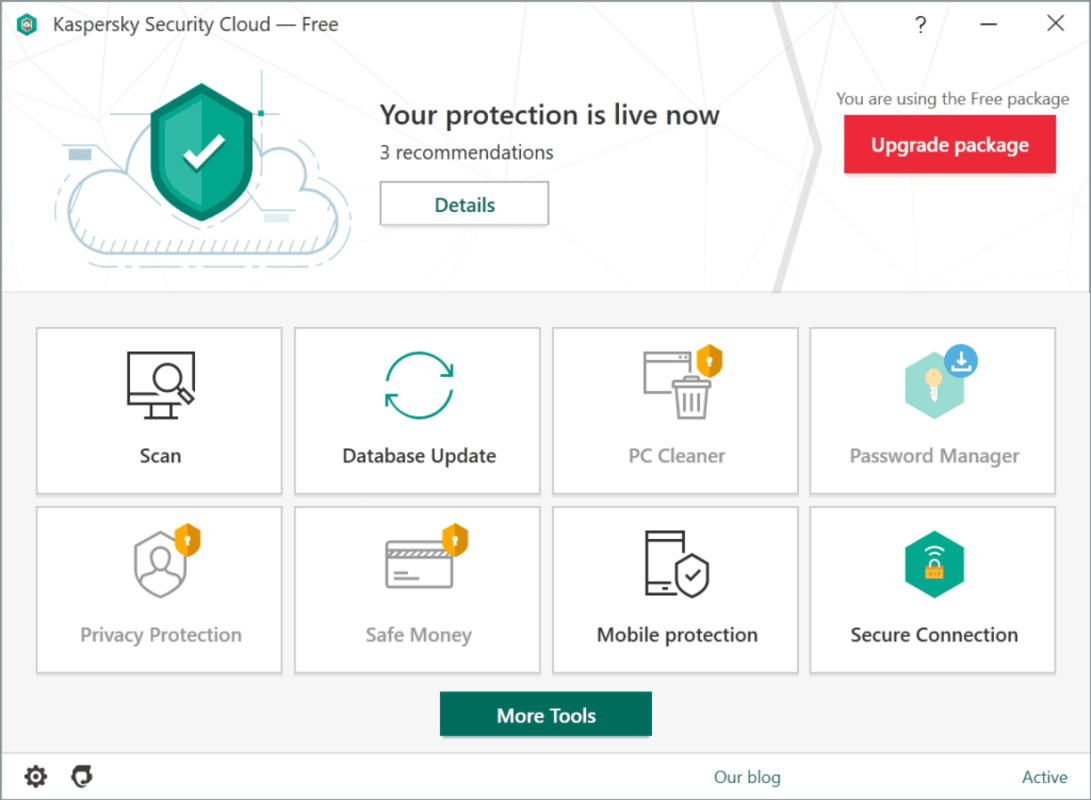
The user interface of Kaspersky Security Cloud is designed with clarity and accessibility in mind. The layout emphasizes essential functions such as threat status, device protection, and network health, allowing users to quickly assess their digital safety. Visual indicators, such as color-coded alerts and progress bars, help convey security status at a glance.
Navigational flow is intuitive, guiding users through core features with minimal steps. Menus are logically organized, and key actions—like running a scan or adjusting parental controls—are accessible from the home screen. The app maintains consistent design language across screens, contributing to a cohesive user experience.
Although the developer did not list formal performance metrics, the app operates efficiently within the 50.1 MB file size constraint. It demonstrates responsive behavior on mid-range and high-end Android devices, with minimal lag during routine operations. Stability appears reliable, with no reported crashes or freezes in public usage reports. The app also functions smoothly in background mode, ensuring continuous protection without draining battery excessively.
Platform Compatibility & Technical Requirements
Kaspersky Security Cloud is available exclusively on the Android platform. The current version is 5.2.0, with a file size of 50.1 MB. This lightweight footprint makes it suitable for a wide range of Android devices, including budget smartphones and flagship models.
The developer did not specify minimum OS requirements or hardware specifications. However, given its compatibility with multiple device types and cloud-based architecture, it is likely optimized for Android 6.0 (Marshmallow) and above. Users should ensure their device meets general Android standards for app installation and background service execution.
Compatibility information was not fully disclosed. The app may support future Android updates, but no official details were provided. Users are advised to keep their device and app updated to maintain optimal performance and security.
Pros and Cons
Pros
- Multi-platform protection across Android, iOS, Windows, and macOS
- Cloud-based management for seamless device oversight
- Real-time threat detection and anti-ransomware defense
- Comprehensive parental controls and breach detection
- Lightweight design with minimal storage impact
Cons
- Platform availability limited to Android only
- Specific OS requirements were not listed
- Full functionality may depend on additional subscriptions or services
- Some advanced features may require internet connectivity
- Developer did not disclose detailed performance benchmarks
FAQ
Is Kaspersky Security Cloud free to use?
Yes, the app is available at no cost. However, certain advanced features may require a paid subscription for full access.
Can I use Kaspersky Security Cloud on multiple devices?
Yes, the app supports multiple devices under a single account. Users can protect Android, iOS, Windows, and macOS devices from one centralized dashboard.
Does the app work without an internet connection?
Basic protection functions operate offline, but real-time threat updates, cloud monitoring, and remote management require an active internet connection.
How does the parental control feature work?
Parents can set content filters, time limits, and activity reports to monitor and restrict their children’s online behavior. These settings are synchronized across devices via the cloud.
Is my data secure when using the cloud-based features?
Yes, Kaspersky Lab employs encryption and secure protocols to protect user data stored in the cloud. The app is designed with privacy in mind, and no personal information is shared without consent.
Final Thoughts
Kaspersky Security Cloud stands out as a powerful, all-in-one security tool tailored for modern families and individual users navigating complex digital risks. Its ability to unify protection across platforms, deliver real-time threat intelligence, and provide family-focused safety features makes it a compelling choice in the mobile security space. While limited to Android, its lightweight design and cloud-centric approach ensure broad accessibility and long-term usability.
For users seeking reliable antivirus protection, password management, network monitoring, and parental controls—all in one app—Kaspersky Security Cloud delivers exceptional value. It balances robust security with user-friendly design, making it ideal for both tech beginners and experienced users.
Download Kaspersky Security Cloud now


